Saturday, September 22, 2007

Function over form

I was itching for something to buy with my iPhone credit, so after seeing Elliott forked up the $10, I got the Belkin iPhone headphone adapter for use with my Bose TriPort headphones. If you've seen them before, you might have wondered whether they really needed to be that long and obtrusive. See below for one of the reasons why:

Wednesday, September 19, 2007

Playing with Numbers

This is the beginning of a correction to my previous post.

By the way, I do mean Numbers, Apple's spreadsheet application.
UPDATE (9/20/2007): Seems my estimates were very conservative according to this NYTimes blog post that comes to a similar conclusion (see revised chart), that Apple could afford to sell iPhone at a loss [via tuaw].

Friday, September 07, 2007

iPhone debriefing

Apple CEO Steve Jobs wrote an open letter to iPhone early-adopters today adamantly defending his company's decision to drop the price on iPhone by a third, or $200, after just two months. Although he believed the price drop was the correct thing to do, Jobs recognized that Apple underestimated the effect it had in jeopardizing the trust of its first million iPhone customers. To reassure them, he will be issuing a $100 store credit, single-handedly creating 100 million in consumer surplus.

Rationalization


By yesterday morning, I had already come to terms with my very late early adoption. While I originally got the iPhone on launch day, I returned it two week later, only to buy it back once a screenshot of Vim running on the iPhone was posted. As a huge Apple fan, I'll admit I was willing to pay even more for the iPhone and wished to be mature and take responsibility for my actions. Luckily and despite my previous misgivings, iPhone has not ceased to delight me. You may think that it's all cognitive dissonance and I will not defend against that accusation. I do, however, feel like the signs of the price drop were all there by the time Steve Jobs made the announcement on Wednesday.

I knew it! (not really)


First of all, after all the pent up demand, Apple's first full month of sales only exceeded their 2008 target of 1% mobile phone market share by 80%. They would have a really hard time sustaining that $600 demand for 18 months. Second, Apple has decided to implement subscription accounting (is that what they called it) for the iPhone since they're receiving monthly payments from AT&T in return for the exclusivity in the US market. That means they'll be recognizing the revenue of iPhone over the two-year service contract.

If Apple intends to sell 10 million iPhones in 2008, that'd be an average of 833[,333] a month. Even if they receive a generous 10% of AT&T revenues of $60 per line month, it comes out to be an average of $60,000* each month for two years. It'd be a stretch to also recognize the hardware revenue monthly at $500,000, or [up to ] three times the [profits from ]subscription revenue. Finally, we're all used to subsidies by mobile phone service providers with 2-year service contracts. Prices fall sharply and may not reflect the actual cost of the hardware and volumes matter a lot. Apple fans quoted Motorola's RAZR's similarly high intial selling price to justify our purchases but forgot about how fast it became virtually free with service contract. Yes, hind sight is 20/20, but I hope this was an interesting exercise.

Wait at your own risk


One thing that's nice to keep is your conviction in times of difficulty. One rule I've preached is to buy Apple hardware day one to maximize your value against obsoletion. I practiced what I preached, but to my detriment broke the rule eight weeks later on the trust that Apple wouldn't screw their customers that badly (i.e. within a quarter). This was the same belief I held when I thought they couldn't possibly release another iPhone within a year of the first generation possibly sporting a broadband wireless modem (UMTS/WiMAX?). That's the very trust that Mr. Jobs rightly seeks to maintain.

As a brief summary of what currently delights me about the iPhone asides from its fantastic exposition of functionality, check out (if you haven't already) Installer.app or iBrickr. They are a testament to the current state of native application development for OS X on iPod (iPhone and iPod touch).

SOURCES: iPhone margins, iPhone July sales, Apple Q3 Earnings Conference Call (6:11")


*(10,000,000 units / year or 12 months x 10% share x $60 service charge) x average monthly revenue taken over lifetime of 24-month contract (1 + 2 + ... + 24) / 24 months = $60,000

UPDATED (9/19/2007 00:44 EDT):

I was off by a factor of 1000. Instead of average monthly payment from AT&T being generously estimated at 60,000, it should be over 60,000,000. Thankfully, nobody actually read this (yet)! I'll try to fix it.

Monday, August 20, 2007

Oops, I did it again

I'm pleasantly surprised at how well I'm doing typing on the iPhone.
No, I couldn't think of a better allusion.

Wednesday, August 15, 2007

Epiphany of the Day #4

Not sure if you noticed the 'DVDs are for losers' vibe at last week's Apple press event, but I sensed that there would be no next version of iDVD. See where I'm going with this? Among computer manufacturers, Apple sided with Dell and Sony in supporting the Blu-ray Disc format against notably Microsoft and Toshiba's support of HD-DVD. Other manufacturers have begun offering Blu-ray disc drives and burners on their computers, but Apple seems to be waiting for it to reach critical mass.

Count on Apple to jump in just before that moment with support in the Mac Pro and eventually in an iDVD replacement (iBD anyone?). iBD won't be a killer app or anything, but if released, is likely to mark the triumph of the format.

Thursday, August 09, 2007

Favorite little features of iLife '08

I didn't think I'd be upgrading my bundled version of iLife, Apple's Mac-only entry-level digital media lifestyle software suite. Every new Mac comes with iMovie, iPhoto, iDVD, Garage Band and iWeb. I think this time it's a good value even if you have to pay the full price to 'upgrade'. As a little introductory rant, iLife can be viewed as a package of demos for Apple's professional software offerings. iPhoto is an ultra light version of Aperture. iMovie is a basic version of Final Cut Express and Final Cut Pro. Garage Band is the baby version of Logic Express and Logic Pro. The two features I'm about to mention are so valuable yet deliberately left out of iLife for all the previous versions.

If you've ever taken video using your digital camera in the portrait orientation, you probably regretted it after loading it onto your computer since it'd only display in landscape view anyway. One cool new feature in the new iMovie is cropping and rotating video. Previously, this feature was also available from Apple as part of Quicktime Pro (29 USD) or sold as a third-party iMovie plugin. Windows users can use VirtualDub, although it's not the paragon of user-friendliness.

The other feature I liked that was only briefly mentioned in the press event is notation printing in Garage Band. In previous versions, Garage Band would show you the musical notation of tracks you create but the ability to print it out was found only in the premium Logic offerings. Now, even if you don't write music in your spare time, you can open up a MIDI file in Garage Band to view the notation and then theoretically print it out to play on the piano.

Sorry this is getting long, but if you're not already bored, bear with me for just a bit longer.

I can't talk about iLife without also mentioning the brand new iMovie. It borrows a feature of Windows MovieMaker where it will automatically create scenes within in your videos by looking at when the camera was stopped and restarted. It also has speeds up the process of creating videos by including a really fast way to 'scrub' through and select scenese by mousing over the thumbnails. Conservatively speaking, iMovie and iPhoto themselves are worth the 79 dollar cost of iLife, not including educational or corporate discounts. It's worth mentioning that iPhoto has a new feature to easily if not automatically group the photos in your library into events. I'm also going to get iWork. You've doubtlessly heard at least of past rumors about its slick new spreadsheet application, but I have less of a legitimate reason for getting it. Takers?

Product links: iLife, iWork

Monday, August 06, 2007

On my aging Dell laptop

My Dell Inspiron 6000 is getting old. I've only had it for about 18 months, and although I don't use it very much I still like it a lot. The first sign its aging was the increasingly intolerable slowness. I haven't reinstalled Windows on it but I will very soon. If you have a Dell, there's a good chance that you don't have installation media as Dell provides a recovery partition on the hard drive. Dell supplies one copy of backup installation media if you request it.

What you don't necessarily want to do is to get your replacement batteries from them. Dell doesn't have a huge incentive to keep making fresh batteries for old models like mine, so anything they have in stock is refurbished or old. Since lithium-ion batteries age from the day they're made, old batteries are almost as bad as refurbished ones. Plus, they still try to charge you as if they're fresh even though none of the customer reviews make three out of five stars.

I mentioned before that Dell batteries have indicator lights that show charge and battery wear. Check this out:
Unfortunately, that's not the charge; it's complete battery wear and it's completely accurate. I bought a higher capacity battery (80 to my 53 WH) on eBay for less than half the price of replacing the original. The after-market battery even comes with the charge-indicator lights.

Tuesday, July 31, 2007

Not the Apple headset


If you do not need your headset to match your iPhone, charge in the same dock, and have its battery charge status displayed on the screen of your iPhone, OR if you don't really need one and can't justify spending the list price of 129 USD, then you'd want to check out the Motorola HS850. I haven't put it through a battery stress test, but it gives no hint of losing a charge after casual use (an hour or two at a time) and charges super quickly.
  • Standby time: 200 hrs
  • Talk time: 8 hrs
  • Accessories: AC adapter (different voltage than phone)
  • Notable: Memory enables pairing with up to 8 devices (not simultaneously), but it only automatically seeks out the last device connected.
Although this probably originally retailed around the same price point as the Apple headset, you can get it at Buy.com for 35 USD including shipping.

Sunday, July 22, 2007

Martha on iPods

Chances are that if you're reading this, you have an iPod or another portable audio player. Be sure to observer proper listening etiquette. In this month's WIRED magazine, WIRED staff interview Martha Stewart to find out 'how to make everything better'. For her home music setup, Martha suggests putting an iPod connected to wireless speakers in each room of the house, a simple and unobtrusive way to get the job done. She does have mixed feelings about digital media players, and when she was speaking the subject of blackberries and digital communication, she said the following:
[Martha] It's horrible. You can not forget human communication. When the Walkman first came out, I called it the Rudeman: Everybody who's listening to those is rude to me. I think part of the reason I got divorced was because of the Rudeman. [WIRED] Really? [Martha] Oh, yeah. I'd be in the garden, weeding and chatting away and no answer! ...
For more, check out WIRED's 'How to...' feature starting on page 101 in the August 2007 issue. On the cover, you'll see a photo of Ms. Stewart baking a Wii cake. FYI, the recipe is on page 119 but isn't attributed to her.

At the time of the post, I couldn't find a link to the article.

Saturday, July 21, 2007

It's been said that Facebook is the new Google

An ex-googler who managed Page Creator said that Facebook is "the Google of yesterday, the Microsoft of long ago". Now, I'm not the biggest fan of Page Creator, but when you think of the best places to work, Google is no longer the indisputable choice for most [new ]software engineers [forget Goldman]. Blake Ross, creator of the alternative browser Firefox, co-founded a startup called Parakey to develop a web-based operating system. Now, he's still doing that, but now he's [just ]working for Mark Zuckerberg.

SOURCE: DealBreaker [at which a blogger dramatically understates Blake's contribution to Firefox: "they surfed the net a lot using Firefox, not Explorer"]

Sunday, July 15, 2007

Apple TV's power consumption

The Apple TV is a nice addition to any HDTV setup. It's currently the hottest setup component we have next to the PS3. Taken literally, that's because the TV is always on and lacks any form of active cooling, leaving it very warm to the touch. While this is worrying from the perspective of power consumption, it turns out that I should be more worried about the 60 watt incandescent bulb above my head.

According to Apple Support forum-user rverwij, the Apple TV consumes about 14 watts in standby and between 17 and 19 watts while in use. The reason the Apple TV is always on is probably to increase responsiveness and to sync your content so quickly you don't have to ever manually intervene. Another reason might be to avoid startup times or even to reduce what could be constant wear and tear of booting and shutting down. This doesn't make it energy-start compliant, though, as rverwij also points out.

To be honest, I wouldn't mind going back in time to defer my purchase of the Apple TV, since clearly the best is yet to come. I also believe that to be the case with the iPhone, which I returned it unopened a week after purchasing it on release day.*

SOURCE: Apple Support Discussions

Updated 10:16 AM EDT: * The official reasons I returned the iPod[iPhone]: 1) I never really intended to buy it. 2) I just got a new 30 G iPod in February. 3) It doesn't have a killer feature like the Unix terminal. 4) I still have a contract with my current wireless provider Verizon Wireless that ends in October. 5) ...

Updated (March 28, 2011): This post applies to the First Generation Apple TV. The newer Apple TV is smaller and more more power efficient than the original and only consumes 6-watts (it only has a 6-watt power supply). 

Saturday, June 30, 2007

Friday, June 29, 2007

How I ended up buying the iPhone

So I get off work thinking that I'll just pop in to the Apple Store and check out the iPhone. You could say I was on the fence about it. I try making my way up to the Fifth Avenue Apple Store and see an excited crowd of people standing under some scaffolding, which turned out to be an AT&T store. I'm at the end of the line and happen to stand next to the guys on the front, who'd been on line since 2PM (iPhone went on sale at 6PM). It's about 8 so I think it's pretty futile so I keep on moving to the 59[8]th Street.

When I get there, I see a good number of people streaming by carrying iPhone bags (yes, special iPhone bags). One was actually walking towards the glass cube of an Apple Store. This unlucky guy got the iPhone but lost his wallet in the excitement. When we get to the GM building, which overlooks the Apple Store, I suggest that he talk to the journalists hanging around with their cameras. His would make a great story. The line folded over itself on the sidewalk not much differently than at the AT&T store, but it was moving noticeably faster. Apple had employees enthusiastically greeting and welcoming customers down through the glass doors and stairs at a controlled rate. Overall, I think it took about 15 minutes to get 75 people into the store.

Now, if you were on the fence at all, you probably wouldn't survive what came next. After spending 15 minutes online (which was pretty good), you wind your way down the spiral staircase right into an Apple Store [employee ]ushering you onto the line to pay for the iPhone. On finding out the iPhone displays were all the way on the other side of the store, I figured it was either get an iPhone right that instant or get back to the end of the line. That's pretty much all it took to get me to fork up my credit card and say "8 gigabytes".

I then spent the next half-hour or so testing out the iPhone. It was smaller than I imagined and more rugged. The screen was very nice and crisp and I was even able to call home to tell my parents what I had just done. I browsed to this page, checked my Gmail, watched the QuickTime guided tour on apple.com (yes, embedded videos work), and checked out pretty much all the standard features. It was very close to what I expected, and not really much more. I found the iPod interface a departure (for all the right reasons) from the one we're all used to. Nothing was disappointing, and if anything, it was in how large my thumbs were compared to my index finger. Some quirks: the screen only rotates in one-direction, you have to bring up the keyboard after you rotate the screen in Safari to get a landscape keyboard.

And, the keyboard.

How was the keyboard? It was very good at correcting my mistakes, but it will require some practice. Practice I'm not sure I'm going to get. The iPhone comes with a 14-day return policy and a 10% restocking fee for opened boxes. I'll have to sleep on it. The killer features like an X11 unix terminal are just not there yet. VI would be perfect and doesn't require arrow keys or ctrl and alt keys. I have to give it to Apple, though. They had enough iPhones. I was slightly worried that the lines to actually buy stuff tapered off by the time I left, but there is hope. Around 8:45 PM when I walked out flanked on both sides by cheering store employees (not kidding), there were still about 50 people online waiting to check out the iPhone.

Wednesday, June 27, 2007

If anyone is proficient at typing using iPhone's on-screen keyboard, a lot of it will be due to Apple's adaptive keyboard software. If you haven't already seen the video, here's a behind-the-scenes look at all the stuff happening in the background as you type.

iPhone Keyboard Demonstration

SOURCE: Digg

Tuesday, June 26, 2007

Vindicated by Walt Mossberg

Mr. Mossberg, tech reporter for the WSJ, says that after five days, he's able to type on the iPhone as fast as he does on his Treo, which has a physical qwerty keyboard. Also, it looks like the only way you'll get Exchange email on iPhone is if you enable POP or IMAP on the server.

SOURCE: Testing Out the iPhone [WSJ] via Digg

Sunday, June 24, 2007

An account of the iPhone keyboard's ineffectiveness

Engadget's Ryan Block posted the thoughts of an early iPhone user about a pretty bad experience with the on-screen keyboard yesterday. The language Ryan uses in the post is a bit odd, most likely paraphrasing notes from a conversation meant to hide the gender of the source. The gist of it was that typing on the iPhone is "disappointing" despite the built-in error correcting having had days of practice. The source goes further to specifically cite the difficulty of typing with two thumbs, having to press hard, and the iPhone registering "multiple key presses". These are all surprising to me given the 'on-release' behavior I observed from Apple's videos as well as last week's news about the new glass screens. [I've had my fair share of doubts, but for different reasons.] I guess we'll have to wait and see for ourselves.

SOURCE: Engadget

Sunday, June 10, 2007

An effective finger-based keyboard

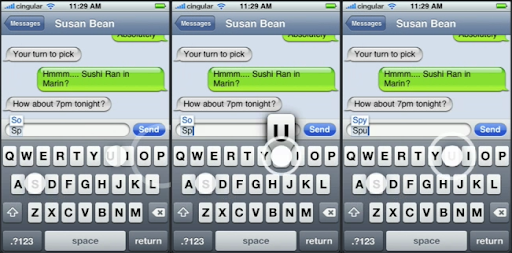
It would[n't] be fair to just say that the iPhone is unsuited for use while driving due to the lack of a keypad without mentioning why it'll be quite comparable to typing on a physical keyboard for sighted people.

iPhone touch-based keyboard

From left to right:
  1. a finger hovers over the letter 'u' (another is over the letter 's')
  2. the finger touches the screen, prompting visual feedback before the input is actually registered
  3. on release, the letter us is registered and appears in the text input field. Until the release, you get the chance to correctively reposition your finger in the event that 'u' was not your intended keystroke.

The visual feedback you get from letter magnification combined with 'on release' behavior instead of 'on click' behavior suggest that typing will be a breeze on the iPhone. Multi-touch, or the ability to touch different parts of the display at the same time, means fast two (or more) fingered typing.

SOURCE: iPhone UI videos at apple.com

Thursday, June 07, 2007

Google Mashups and Google Web Toolkit

So it looks like Google Mashups uses GWT to do its magic. At least part of it. Anyhow, I've updated my bitty Zinc, Inc webpage to include a Google Mashup of a photo album. That's not really mashing anything together, but I also I've also done a quick rendering of most of that page which is a bit more of a 'mashup' of different feeds here. One killer feature of Google Mashups that I haven't tried yet is the ability to create your own feeds and update the data behind it.

Here's a real mashup some googlers made: SF Giants Baseball Mashup

SOURCE: Google Mashup Blog

Monday, May 28, 2007

Dealing with text message spam

A couple of months back I failed to use my better judgment and unleashed my phone number onto a website that allows you to schedule a call to be made to your cell phone, say during a social event, to make you seem more popular. Let's be clear. I was just testing it to see how it worked, and for your information, I couldn't keep up with the recording's fast paced conversation. Regardless of whether this slip was the cause of my small misfortune, I start receiving about 30 spam messages a month on my Verizon Wireless phone. This was OK back when text messages (sans texting plan) cost a mere 10 cents. On calling customer service, they informed me I could fill out a form and block particular email addresses from sending me messages. Since spammers don't use real email addresses (or at least not their own), there wasn't value to be gained by using that form.

Fast forward to a couple of weeks back, Verizon increases the cost of sending and receiving text messages by 50% (sans texting plan). I'm starting to think of switching to Cingular and using an upcoming Apple iPhone just to avoid paying the $3 spam tax. Luckily, there's a feature to turn off receiving text messages from the internet as well as from vtext.com.

If you're a VZW customers can rid yourself of internet stalkers and spammers, go to http://www.vtext.com/ to change your text preferences (account registration necessary).

SOURCE: Lisa from Verizon Wireless 611